APIScribe: DevTools panel for recorded API evidence and exports
APIScribe, developed by Aditya Nandedkar, is a Chrome extension that captures API interactions for documentation and debugging inside DevTools. The extension records XHR and Fetch calls in real time and captures endpoint, HTTP method, payloads, status codes, and timing for structured logs. It offers session controls, Markdown and Plain Text export, and customizable capture preferences. Frontend developers and QA engineers gain a local-only workflow that preserves sensitive API data on their machine.
How does APIScribe record API traffic inside DevTools?
Installed as a dedicated DevTools panel that appears alongside Elements, Console, and Network, the extension streams XHR and Fetch requests live and displays entries with URL, HTTP method, request payload, response status, and timing metadata. The panel separates API calls from generic network noise and formats each entry so it can serve as forensic evidence during reproductions and bug reports.
How granular are session controls and export options?
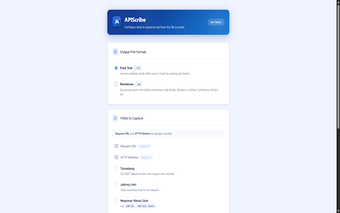
Recording sessions use Start, Pause, Resume, and Stop controls so captures persist across interrupted tests without losing gathered entries. Settings let users toggle inclusion of headers, response bodies, and latency values before export. Exports produce structured Markdown (.md) or Plain Text (.txt) files, formatted for human-readable evidence and quick insertion into issue trackers or documentation, which suits workflows that require copy-paste-ready logs.
Does APIScribe keep captured API data local and where do settings sync?
The extension processes captured API traffic on the local machine and does not use accounts, cloud storage, or external analytics, reflecting a local-only design. Capture preferences sync with the user's Chrome profile so settings travel with a signed-in profile while recorded data remains on the device until explicitly downloaded. The extension targets Chrome on desktop platforms rather than acting as a system-wide proxy.
APIScribe is a focused utility for in-browser API evidence collection
APIScribe is a practical option for developers and QA professionals who rely on in‑browser debugging and want quick, document-ready API logs. Its narrow scope favors in-context captures and structured exports over broad network forensics, so teams needing system-wide traffic capture should use it alongside other tools. For DevTools-centered reporting workflows, it reduces friction and fits neatly into existing browser-based processes. Adoption is straightforward.